
Modern businesses need modern solutions to manage resources, accelerate growth, and streamline organizational processes. And HRtion is the transforming HR system that brings ease, speed, and control.
Built to eliminate errors, minimize paperwork, and improve the employee experience, HRtion handles all operational tasks, including team management, attendance tracking, onboarding, and compliance.
If you are on the hunt for reliable, cost-friendly, and feature-rich HR software for your business, start with HRtion’s demo version right away, and see for yourself.
But before that, here is a quick walkthrough of the revolutionary software, HRtion, designed by industry experts after years of field research.
What is HRtion? All-in-One HR Software for Businesses
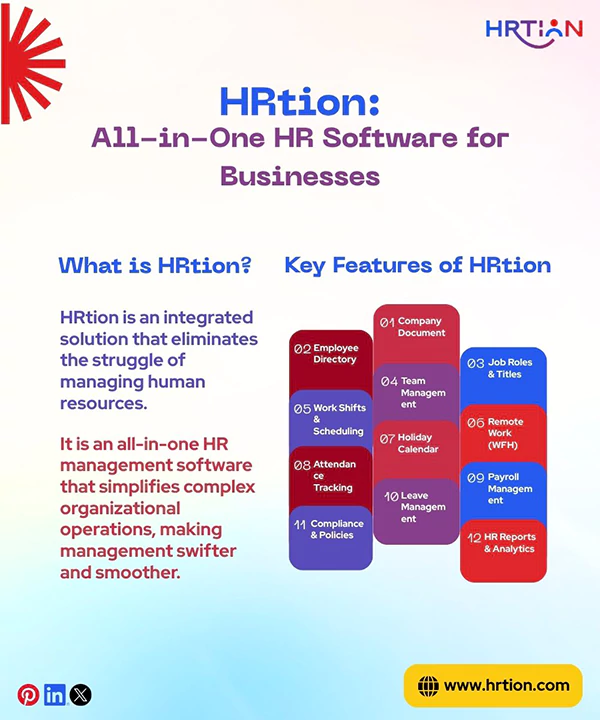
HRtion is an integrated solution that eliminates the struggle of managing human resources. It is an all-in-one HR management software that simplifies complex organizational operations, making management swifter and smoother.
From hiring, managing, growing, and retaining, this software accelerates speed and ease by automating repetitive and exhausting tasks and reducing paperwork.
Not only the HR team but also employees can benefit from this people-centric and versatile software. So, whether you are a small business or a world-class enterprise, HRTion can amplify your growth by offering smoother, more efficient, and cost-effective HR management.
Key Features of HRtion
The impeccable spectrum contains basic to advanced features required by a business to create an environment where collaboration, coordination, and compliance are plain sailing.
- Company Document
Keeping a repository of company documents can be quite challenging for an organization if not automated. With HRtion, every document is now secured and readily accessible to the intended manager, department, or worker.
Whether it’s a company policy, rulebook, or license, everything can be securely saved with controlled access. This ensures that all documents are up-to-date, shared company-wide, and managed digitally.
- Employee Directory
The employee directory offers a real-time overview of the team, divided into categories based on roles, profiles, departments, surnames, IDs, or even contact information. It makes communication direct and effortless throughout the company and helps comprehend the organizational structure.
- Job Roles & Titles
HRtion allows defining and updating roles, titles, and responsibilities for every team member. This provides clarity of job roles, shared or dedicated responsibilities, and the reporting hierarchy in the company.
This feature helps the organization understand the strength of the workforce in each role and department and make an analytical hiring strategy.
- Team Management
With HRtion, the team coordination becomes much more effective as it offers a well-defined team management tool, allowing managers to assign responsibilities, divide teams, provide reviews, and track performance holistically.
This helps promote transparency across the organization and boost accountability and productivity.
- Work Shifts & Scheduling
HRtion provides flexibility to the HR team and managers to plan, allot, and track shifts for the employees. This feature best suits companies with multiple shift timings or schedules, as it keeps everyone in the loop and alleviates discrepancies.
This scheduling feature then tracks attendance according to the implied shift and informs late arrivals and short leavers, ensuring punctuality and well-timed workflow across the company.
- Remote Work (WFH)
Dealing with remote workers often generates an added burden for the administration. Therefore, HRtion helps organizations to manage distant teams while maintaining punctuality, accountability, productivity, and communication.
The tool aims at providing collaboration and coordination without micromanaging or consistent nagging. Every WFH employee gets a portal to log in and log out, apply for leave, and check attendance. Above all, it provides ease in tracking working hours, breaks, late logins, and overtime, promoting transparency and trust.
- Holiday Calendar
Holiday Calendar in HRTion is one of the exclusive features that enables firms to define and communicate holidays provided. This calendar can be decided based on company policy, regions, departments, and specific groups.
The determined calendar that syncs automatically with the leave and attendance system to avoid miscalculations and clashes.
Also, the built-in calendar permits viewing holidays in advance, supporting better workforce planning.
- Attendance Tracking
Coming to the most integral part, attendance tracking becomes seamless with HRTion. Employees can log in from the digital portal, biometric system, or even mobile interface, and every punch-in is synced properly.
Integration takes place across the holiday calendar, leave management system, and work shift scheduling, requiring no manual adjustments.
With this, HR can trace absenteeism, frequent late arrivals, and overtime, then generate an automated record sheet that can be used to calculate salaries, deductions, and incentives.
- Payroll Management
The payroll management system consists of calculating components that determine basic pay, allowances, deductions, PF, taxes, and ESI. Then, it creates a sheet containing an accurate pay slip according to company policy.
Most HRM software lacks integrated payroll systems, but with HRtion, you pay for a single tool and enjoy multiple services like payslip generation and secure salary disbursement.
- Leave Management
Requesting and approving leaves is easier than ever, as the robust system offers a well-defined process for leave management. HRs can further define sick leaves, paid leaves, maternity leaves, and unpaid leaves.
Managers are authorized to reject leaves, state the reason for rejection, and create automated notifications. The software helps with monthly leave accuracy by calculating carry-forward leaves, leave cashing, and leave trends.
- Compliance & Policies
The software helps the organizations stay aligned with regional, state, or national labor laws.
The tool contains details of PF and ESI, company policy, and code of conduct, and helps in maintaining audits and legal reviews on a timely basis, keeping the firm secure from legal threats.
- HR Reports & Analytics
Instead of using manual spreadsheets, forms, and other hard documents, HRtion creates a space for all types of HR reports. The dashboard is entirely accessible to the HR team and contains numerous filtration options for a quick and efficient analysis.
The tool is built to help in making hiring-related decisions, asset management, layovers, and headcount. Also, it helps spot upcoming appraisals, gaps in joinings, productivity rate per head, and overall growth of the company.
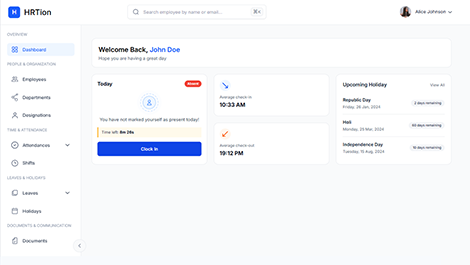
Manage the payroll, attendance, shift roles, and more in an all-encompassing HR suite. Your ultimate HR toolkit is just a click away.
How HRtion Can Benefit Your Business?
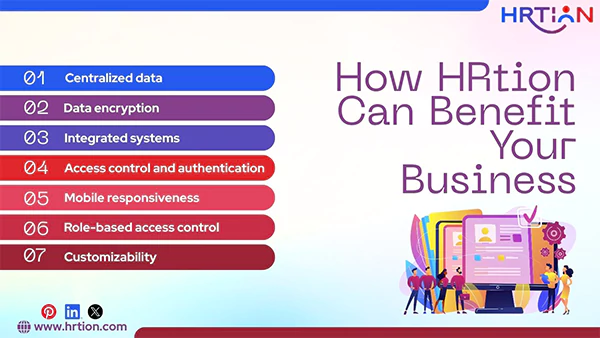
HRtion operates your business activities more efficiently. Here is a detailed analysis of how HRtion can help your business touch heights.
| What HrTion Offers | How Does It Grow Your Business? |
| Centralized data | All information is stored in a unified manner for easy access. It reduces duplication and removes errors. |
| Data encryption | Security is the most demanded element in HR software. Data encryption keeps sensitive information safe from data breaches and security loopholes. |
| Integrated systems | Effortless integration of payroll, attendance, leave, compliance, and performance systems helps businesses enhance productivity and consistency. |
| Access control and authentication | Controlled login mechanisms and managed authentication protect data from unauthorized access. |
| Mobile responsiveness | The mobile-friendly interface lets employees, managers, and HR alike to stay organized, punctual, and productive. |
| Role-based access control | To ensure data privacy, there are different access levels for seniors, juniors, and HRs. |
| Customizability | Flexibility to choose configuration modules, control data access, and select add-ons is meant to serve unique business needs and scale growth for organizations of all sizes. |
Why Choose HRtion?
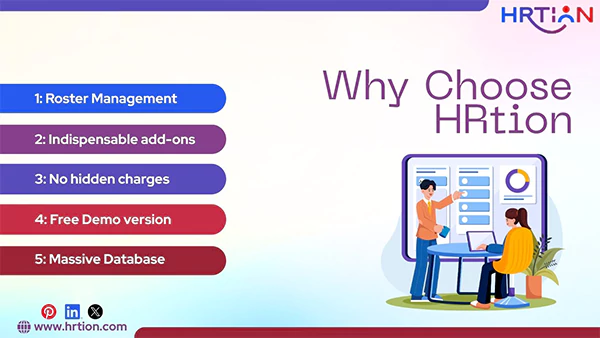
In the crowded market, HRtion stands out not because it automates tasks but because it transforms your business and brings flexibility, convenience, and performance. Choose HRtion and witness your business expanding.
- Roster Management: Well-organized roster management that ensures optimal shift planning and adherence to allocated shifts.
- Indispensable add-ons: Want advanced features like 24×7 support and the Statutory Compliance Module? Choose from a spectrum of add-ons.
- No hidden charges: Pay once and enjoy a full range of features. There are no extra charges for what’s promised.
- Free Demo version: Want to give it a test first? Use the comprehensively designed demo version and decide for your business.
- Massive Database of Happy Clients: From small businesses to multinational companies, HRtion boasts hundreds of business stories that narrate success and growth.
How to Use HRtion? A Quick Guide
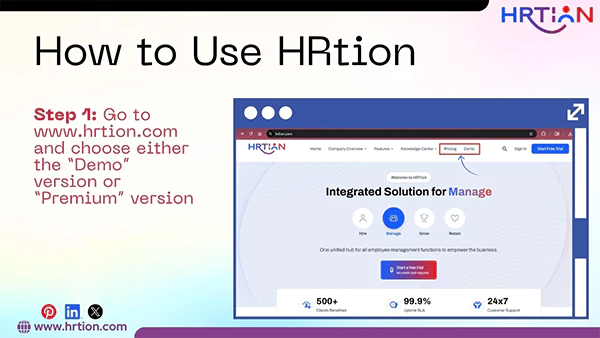
- Choose the Demo version, or buy the plan of your choice from Basic, Standard, or Premium.
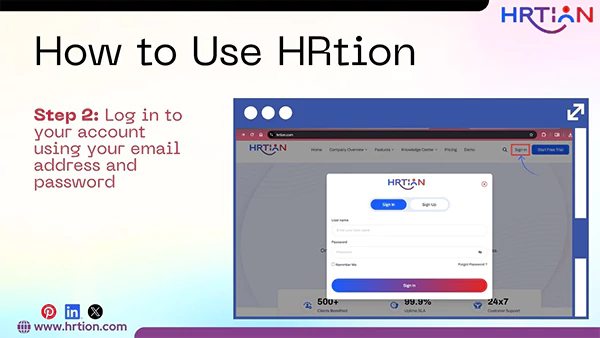
- Log in to your account using your email address and password to open the Dashboard. (Organizations can add TFAs like face recognition if needed.)
- Click on the options from the left menu of the dashboard. The menu consists of Company Docs, Employees, Designations, Teams, Shifts, WFH, Holidays, Attendances, Analytics, Request Leave, Roles, and Settings.
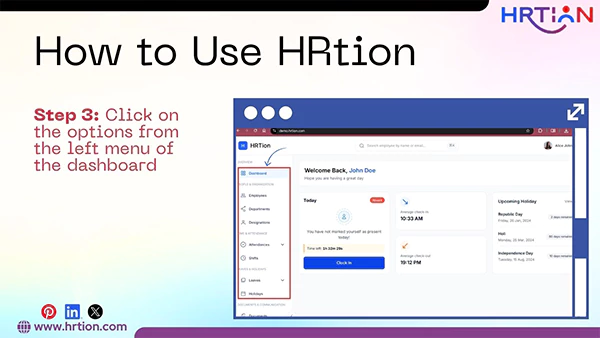
Note: Due to controlled access, some of the features can only be used by managers and the HR team. However, the controls are customizable and can be changed whenever required.
Pricing and Plans of HRtion
There are three packages to choose from: Basic, Standard, and Premium. How are they different? Check out below:
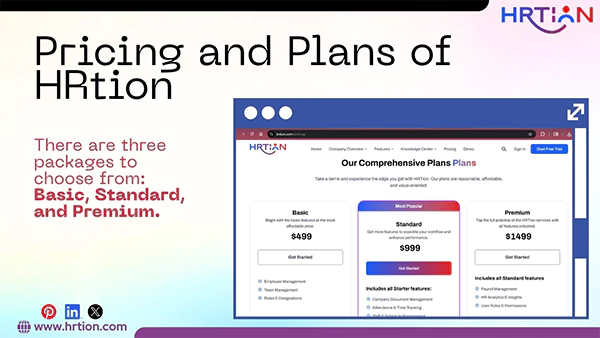
Basic: Best suited for small- to mid-sized companies that only need basic features like Employee Management, Team Management, and Roles & Designations.
Standard: It is one of the most chosen packages among all. It offers all basic features along with added starter features like Company Document Management, Attendance & Time Tracking, and Shift & Schedule Management. It is an ideal choice for mid- to large-sized businesses.
Premium: With all basic and standard features, it consists of Premium features like Payroll Management, HR Analytics & Insights, and User Roles & Permissions. This package works best for organizations working on a larger scale.
Comparing HRtion With Other HR Tools
| Aspect | HRtion | Other Tools |
| Ease of Use | Intuitive interface with simple navigation. Can be used without training. | Usually require extensive training to use. |
| Pricing Transparency | There are no hidden fees for installation or already promised features. Pricing of add-ons is transparent. | There are numerous hidden charges for add-ons. |
| Demo Availability | Free trial version with exclusive features. | No demo availability or extra charges for the same. |
| Mobile Support | The software is highly responsive to mobile users. | Sometimes come with limited mobile features. |
| Add-ons Availability | A wide array of functional and affordable add-ons. | Highly expensive add-ons. |
| Page optimization with CRUD-specific access. | Full freedom to optimize and update changes on any page through authorized access. | Often lacks optimization capability; information once added can’t be changed easily. |
Frequently Asked Questions:
Is HRtion affordable for small businesses?
HRtion offers three packages that offer complete value for money. Small businesses can start with the basic package that only costs $499.
How does HRtion update work?
HRtion notifies users about the upcoming updates beforehand, but there is no certain timeframe for that.
What are the security protocols in HRtions?
With the highest degree of data encryption, HRtion offers complete security for the data stored in it and maintains confidentiality throughout.
Is there any option to import data from other tools to HRtion?
Yes, you can easily import data from other HR systems and start with HRtion through an easy process.
Does HRtion support multi-location workforce management?
Yes, HRtion offers management options for multiple locations, which makes it easier to deal with remote employees.

Sunita Kumari is a Freelance Contributor Writer at HRTion, writing accurate, reliable, and informative content. She completed her Bachelor's from Rajdhani College of the University of Delhi. She has been a Human Resources Recruiter for almost 2 years, including over 1 year with Battersea Web Expert. Drawing on her recruitment and HR processes experience, she writes clear and practical payroll-related guides that help employees and job candidates better understand HR procedures and workplace practices.